
Creating a New Pitch #
If you want to create a new pitch, click on the green “+ New Pitch” button on the top right of the pitch list.

You will see a form popup that you will need to fill out for the pitch.
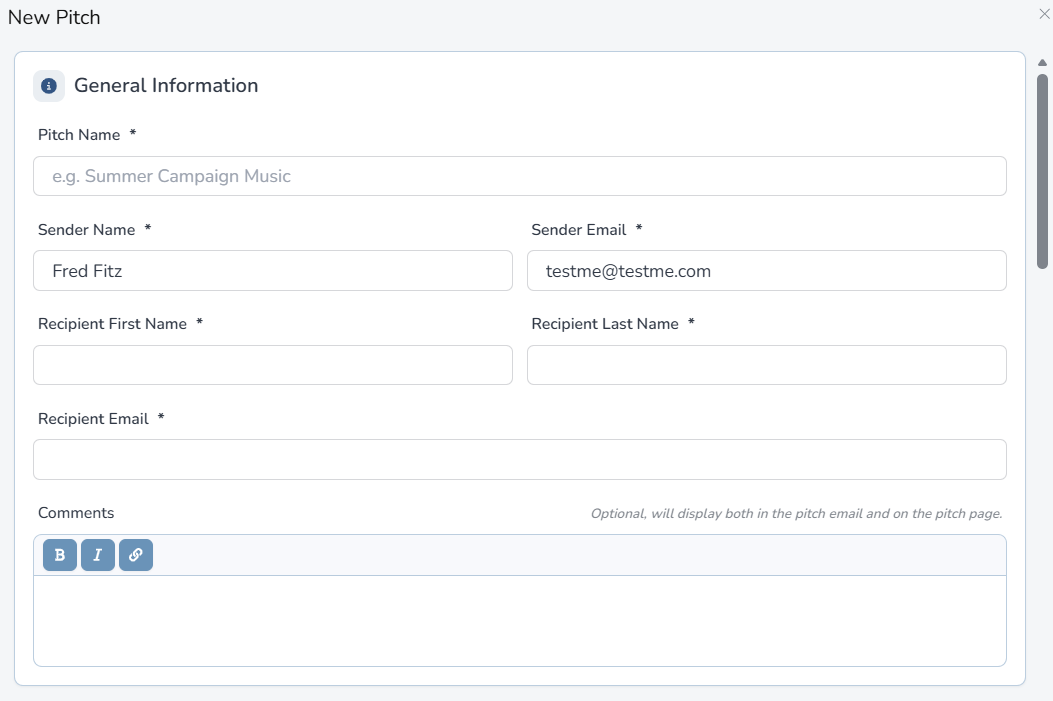
| Field | Notes |
|---|---|
| Pitch Name (required) | The name of your pitch. |
| Sender Name (required) | The name of the sender. |
| Sender Email (required) | Email address of the sender. |
| Recipient First Name (required) | First name of the person you are sending it to. |
| Recipient Last Name (required) | Last name of the person you are sending it to. |
| Recipient Email (required) | The email address of the person you are sending it to. |
| Comments | If you have comments about the pitch, put them here. They will be on the email that the recipient receives, along with the actual pitch page. |
| Playlist (required) | The playlist that you want the recipient to listen to. |
| Delivery Options | Allow the user to stream OR give them the ability to stream and download. |
| Images | The pitch page can show any combination of: (1) An image of the artist OR composer (so if you are pitching as an artist, use your artist image. If you are pitching as a composer, use your composer image). (2) A banner image. (3) Album art. You also can select no images. |
| Social Links | Pick the social media links you would like to appear on the pitch page. |
| Video | If you have a YouTube video link or any other video link, you can promote it on your pitch page. YouTube links will render in the page. All others will show a link. Add a description about the video (optional). It will also show on the pitch page. |
| Options | If you want the pitch page link to expire at a certain date, fill that date in. Also, if you want to show the writers of each track (if you have that metadata in the system), check the “show writers on recipient page” box. |
| Security | If you want to password protect your pitch, you can do so here. But be warned, if you forget the password, you will have to create a new pitch. |


